

Crafting a gameplay Start animation: the impulse under pressure

The start holds a unique place in gameplay locomotion.
It’s the point of contact between the player’s intention, the character’s current state, and the logic of the engine.
A very brief moment where everything has to align for the transition into movement to feel natural and immediate.
In the previous article, we explored what the start reveals about the system: perceived latency, the tensions between animation and engine, the combinatorics of angles, and the design choices that emerge from them.
Here, we shift into concrete production.
The idle already exists. The walk cycle too. Speeds are defined. The engine has its rules, its inertia, its constraints. Animation’s role is no longer to invent a movement, but to fit into a system that is already alive, with decisions already made.
This is where the important choices appear: where to cut the animation, what to leave to the engine, what to keep in animation, and how these decisions shape the final behaviour once the start is integrated.
This is the core of the work: making choices that are not only aesthetic, but coherent with the engine’s behaviour and the constraints of the game.
Download the Start Production Kit PDF
(Pipeline section )
Debug, testing methods, common errors, group conventions, and a complete production planner, everything you need to build solid, coherent, engine‑ready start animations.

The Key Frame: Where to Cut the Start
It’s a decision you learn to anticipate with experience.
Defining the start frame early in the process prevents you from animating frames that won’t be used in the final asset, and gives you a clearer, more readable start from the very beginning.
A start is cut directly in Maya, before integration. With time, you learn to recognize the frame that will work in‑engine, without endless back‑and‑forth.
The cut frame corresponds to the moment when two things happen simultaneously:
the supporting foot begins to lift
the body leans slightly forward
It’s the frame where the character is no longer in idle. They haven’t generated the full impulse yet, but their posture clearly shows they’re ready to move: the foot lifts, the body commits, and the intention is readable.
This is frame 1 of your start.
Everything before it should not exist in the delivered animation.

What Changes Depending on Context
There’s no universal rule for where this frame should fall.
It varies with the character’s attitude, target speed, perceived weight, and the style of the game. A heavily equipped soldier with 30 kilos of gear won’t have the same decision frame as an agile character. A fast‑paced game tolerates an earlier frame than a narrative one.
What is consistent, however, is that this frame marks a clear commitment: the foot lifts, the body moves forward, and the character’s trajectory begins to take shape.
Even if the engine doesn’t use root motion, it remains useful in Maya: root motion is simply the hips projected onto the ground.
It helps visualize the true impulse, check that weight shifts are coherent, and ensure the feet don’t slide.
In gameplay, you almost never animate a start “in place.” Seeing the character move helps you place the weight correctly, manage contacts, and pinpoint the exact frame where the character leaves idle.
The Beyond: Two Souls / Ghost Recon Convention
On Beyond: Two Souls and Ghost Recon, the rule was simple: root motion starts moving on frame 1, and the foot begins to lift on frame 1.
Idle was placed on frame 0, and frame 1 stayed very close to that pose.
The entry pose of the start matched the exit pose of the idle exactly, which allowed an idle → start blend time of 0.
This approach had several advantages:
no visual popping
no foot sliding
very stable engine behaviour
fast and reliable integration
Reactivity was decent, but limited by this tight proximity to the idle: the character started cleanly, but without the sharp impulse you could get by cutting a bit later into the commitment.
With hindsight, we could have pushed it further, but the team conventions were coherent and worked well within the pipeline at the time.
What I Do Today
After exploring reactivity in all its forms on Prince of Persia, not on starts, but on jumps, dashes, slides, dodges, all those animations where the player expects an immediate response, I eventually adopted a different logic for locomotion transitions.
The idea is simple: cut on the frame where the character is already visually in motion. Not at the moment they “decide” to move, but at the moment they are already committed.
The blend handles the connection with idle. The engine handles acceleration.
The animation, meanwhile, comes in to dress a movement that has already begun.
This approach serves the gameplay feel much better: the player sees exactly what they feel on the stick, no delay, no ambiguity.
What Breaks When You Cut at the Wrong Moment
Here, we’re talking specifically about the frame where the start begins, the one that replaces the idle.
If you cut while the character is still fully grounded
The character is still in full support, the foot hasn’t finished rolling off.
Meanwhile, the engine is already starting acceleration.
Result: the character slides, because the animation still shows a static support while physics is already moving forward.
If you cut when the character is already walking
The character has already committed to a step, sometimes even part of the cycle. The engine starts from idle and accelerates, but the animation arrives “too far” into the movement.
Result: a jolt between idle and start, a sharp break between the static pose and the first animated frame.
The correct frame
It sits between the two: the character is no longer in idle, but not yet in a full step. The support is releasing, the body is committing, the intention is readable.
This frame isn’t guessed, it’s tested, with the controller in hand.
Production Rule: the cut frame is not an aesthetic choice. It’s a system decision. It is validated in‑engine, not in Maya.
The Idle → Start Blend: Where the Feeling Happens
Once the start frame is defined, the next step is deciding how the engine transitions from idle to that first frame.
This is handled by the idle → start transition in the animation graph, and it’s this transition that defines the sense of responsiveness.
A blend that’s too long
The transition is clean, but it softens the impulse. The player feels a delay, even if the animation itself is correct.
A blend that’s too short
The transition is instantaneous, but only if the poses are perfectly aligned. At the slightest mismatch, it pops: energy breaks, pose jumps, the character looks like they “teleport.”
The right setting
It’s the shortest possible blend that remains invisible.
Its duration depends directly on the gap between the last idle pose and frame 1 of the start. The closer these two poses are, the shorter the blend can be without artifacts.
This is why the cut frame and the blend are linked: a clean cut frame allows a short blend, a short blend gives a sharp response, and that response is what the player feels instantly.

Production Rule: the idle → start blend is not a comfort setting. It’s the final parameter that decides whether the start responds or hesitates.
Root Motion or Engine: Who Controls the Start Impulse
A Debate That Has Been Going On for Years
Every animator has a preference, often shaped by their experience, the games they’ve worked on, and the way they learned to build locomotion systems.
In my view, one element that’s often underestimated in this debate is the engine you’re working in.
It heavily influences the choice, simply because each engine implements movement, transitions, and the relationship between animation and physics differently.
When Animation Controls the Impulse (Root Motion)
On most of the productions I’ve worked on, Heavy Rain, Beyond: Two Souls, Assassin’s Creed, Ghost Recon (all on proprietary engines), starts used root motion.
And for those pipelines, it was the right choice.
Root motion brings two major advantages:
Precise foot placement: The engine follows exactly the trajectory defined by the animation. No foot sliding, reliable grounding.
Clean transitions: Start → stop, start → other states: since the engine always knows the exact position of the character and which foot is in contact with the ground, transitions are simple and robust.
In proprietary engines like those at Quantic Dream or Ubisoft, this integration was native and straightforward.
A beginner could integrate a basic locomotion set (idle, start, walk, stop) in a few minutes, with no foot issues.
The philosophy was: animation provides the placement information to the engine.
When the Engine Controls the Impulse (No Root Motion)
What proprietary engines handled natively requires, in Unreal:
specific nodes
gameplay tags
system layers
Character Movement settings
more granular conditional transitions
In this context, letting Unreal handle acceleration can be more effective than trying to control everything through root motion.
The Character Movement component is robust, responsive, and designed to react quickly.
Animation can then focus on:
the visual impulse
the pose
the transition
the readability of the movement
It’s a different philosophy: the engine handles impulse and physics, and animation comes in to dress that movement.
It’s a more systemic, less animation‑driven approach.
Animation is no longer the source of truth for placement, it becomes a visual layer applied on top of a trajectory controlled by the engine.
What This Changes in Practice
With Root Motion
Movement comes from the animation. The engine follows exactly the trajectory and foot contacts defined in Maya.
Concretely, this means:
feet don’t slide, even during complex transitions
starts and stops align naturally
blends are clean because both animations speak the same “language”
coherence comes from the animation itself, not from an external system
It’s a pipeline where the animator controls the perceived physics.
Without Root Motion
Movement comes from the engine. The animation aligns itself to a real‑time acceleration curve.
Concretely:
reactivity can be better, because the engine adjusts speed instantly
animation must be designed to support physics, not dictate it
transitions require more logic: conditions, speeds, tags, blend rules
Character Movement becomes a central part of the pipeline
It’s a pipeline where animation dresses a motor‑driven physics system.
Both Approaches Work
The choice depends on:
the engine
the existing pipeline
the game’s style (cinematic, action, competitive, open world…)
the team (animation‑driven or gameplay‑driven)
the available tools
There is no universal truth. Only different contexts, and solutions adapted to those contexts.

Production Rule: the question isn’t “root motion or not.” The real question is: for this game, in this engine, with this pipeline, which layer should control impulse and placement?
Directional Starts: Producing What Needs to Blend
The combinatorics were covered in the previous article.
Here we move into concrete production, and there is still no universal way to handle this topic.
Every engine and every pipeline imposes its own constraints. What follows describes a classic, robust approach, but one that must be adapted to the context.
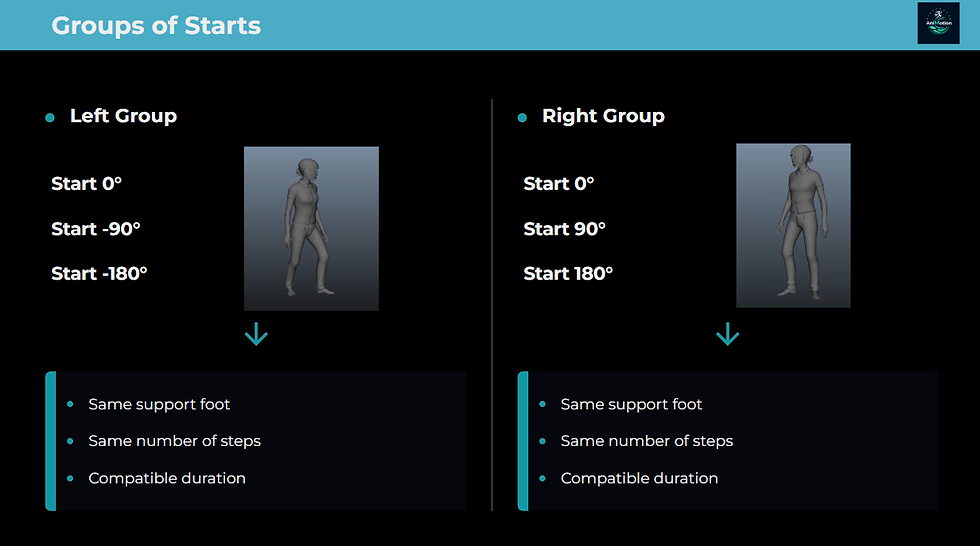
In a traditional setup, each side (left / right) forms a group.
All starts within the same group must blend cleanly with one another.
This imposes strict conventions that the entire group must follow before the first start is animated.
Duration and Number of Steps
All starts in a group must share:
a compatible duration
the same number of steps
The 180° case is the most restrictive: a straight‑ahead start uses a single step, while a 180° start may require an additional step so the body can pivot naturally before moving forward. But if the engine blends 0° to 180° starts within the same group, it expects the same number of steps.
On Beyond, we solved this by removing certain foot events on 180° starts so the engine wouldn’t count them, and by artificially normalizing the duration.
The visual result was acceptable. The systemic logic remained coherent.
The Support Foot
In a start, each side determines which foot lifts.
Left‑side starts lift the left foot, and therefore must transition into the walk on the left foot.
If an animation in the group is delivered on the wrong foot, it becomes immediately visible in integration in two ways:
During blends between neighboring angles: the engine blends a “left‑foot start” with a “right‑foot start.”
Result: incoherent mechanics, supports cross, feet mismatch, and the movement becomes physically impossible.
During the transition into the walk: the system expects one foot, but receives the other.
Result: a visible pop, a foot mismatch, or a sudden foot switch.
It’s an error that’s easy to fix, as long as you understand where it comes from.
Production Rule: the conventions of a start group must be defined before animating the first start. Changing them mid‑production means reworking the entire group, sometimes every single animation.
Mocap: Rebuilding the Impulse
In mocap, the problem with a start is the opposite of a stop.
In a stop, the actor decelerates for too long, so we compress the deceleration.
In a start, the actor prepares their impulse over several frames, so we compress the anticipation.
But in reality, we’re not really “compressing.” We’re rebuilding.
The actor naturally loads their start: bending, engaging the hips, preparing the support. It’s realistic, but far too slow for a playable character.
The work, then, is to remove all the frames where nothing meaningful happens, identify the first real intention, the moment the foot lifts and the hips drive forward, then reattach a clean idle pose at the beginning and a clean walk pose afterward.
We clean the animation between those two points, and we cut on a pose that is already dynamic, already committed.
The result is simple:
At frame 0, the character is already in an impulse pose, even if they’re still at 0.0.0.
At frame 1, they are clearly moving.
We keep the overall dynamics, the attitude, the body angles, the direction of movement.
We rebuild the initial impulse, the first foot contacts if compression created artifacts, and the root motion of the first frames, which often needs rebalancing.
Just like with keyframe animation, a mocap start is not a physical truth to preserve. It’s raw material to reinterpret in service of the game.
Production Rule: in mocap, the natural impulse is always too long. The actor prepares their start. The character, however, must already be moving.
What Seniors Really Look At During Integration
When you first discover locomotion, you naturally focus on what you see: the smoothness of the start, the cleanliness of the pose, the coherence of the movement.
With experience, you learn to look at something else: what the engine is doing around the animation.
A senior looks at:
Does the input trigger an immediate response, or is something delaying the start?
Is the idle → start blend invisible, or can you feel a micro‑acceleration, a slide, a tiny hitch?
Is the start → walk transition coherent: support foot, speed, foot contacts, arm poses, movement energy?
Does the start survive input spam, rapid triggers, and rapid cancellations?
Does the 90° start blend cleanly with the 0° and the 180° starts?
Does the start → walk transition avoid foot switches?
Does the start hold up at +10% and -10% of nominal speed?
This is systemic validation, not a polish checklist.
A start can look perfect in Maya and fail every one of these points once integrated.
Production Rule: a start is only validated when it survives torture. Not when it looks good in Maya.
Red Flags: The Typical Errors
Every error is a diagnosis, not a failure.
🚩 Soft start → cut frame too late, or idle → start blend too long. The player waits.
🚩 Sliding start → root motion doesn’t begin early enough, support foot is inconsistent, or engine acceleration is poorly calibrated. Animation and physics are telling different stories.
🚩 Floating start → impulse missing or over‑compressed. The body hasn’t visually committed at frame 1.
🚩 Popping start → blend too short, or gap too large between the idle pose and frame 1 of the start.
🚩 Starts blending into each other incorrectly → inconsistent normalization between angles, or mismatched support foot on two starts from the same side.
🚩 Start looks correct alone but breaks in sequence → the exit pose doesn’t blend into the walk on the correct foot. The issue is at the end of the animation, not the beginning.
🚩 Start holds up in simple tests but breaks under input spam → interruptibility window not anticipated. The animation isn’t built to survive a frame‑1 cut.
Conclusion
A start isn’t defined by the beauty of its pose or the quality of its step.
What makes it demanding are all the invisible decisions around it: the exact cut frame, the way the engine handles acceleration, the idle → start transition that shapes the feeling of responsiveness, the group conventions that must hold across all angles before the first animation is even created.
A start lives inside a system, the engine, gameplay, blending, physics, inputs, speeds, transitions. That ecosystem is where everything happens.
And in the end, the goal is not for the start to be noticed. The goal is for it to disappear, to become a natural continuity between the player’s intention and the character’s movement.
In gameplay, an invisible transition is a successful transition.
A start that vanishes into the control is a start doing exactly its job.
Download the Start Production Kit PDF
(Pipeline section )
Debug, testing methods, common errors, group conventions, and a complete production planner, everything you need to build solid, coherent, engine‑ready start animations.

Comments