

The Stop in Gameplay Animation: the First Transition that Puts Your System to the Test

Updated: May 6
Integrating a stop animation into production is always a particular moment.
You hook it up, launch the game, let go of the stick… and you instantly feel whether your system holds together.
From that point on, you can’t judge anything in Maya anymore.
You have to test it in‑engine, controller in hand.
It’s the first time input, engine and animation all have to react together to a player’s intention, the moment when the player’s feedback becomes tangible, when the gameplay starts to actually exist.
The moment when animation stops being a sequence of isolated states, and becomes a system that can react, chain, and adapt.
From that stop onward, everything else can finally be built.
Download the Gameplay Animation Framework – STOP PDF (Frameworks section)
Understand the stop as a systemic crossroads
4 pages to structure solid gameplay stops: a complete Decision Sheet, a diagram of the STOP as a transition hub, and orientation logic with minimal combinatorics. Compact, clear, and designed as a production tool.

The stop facing the system
The idle lays the foundation. (Idle article)
The walk establishes movement. (Walk article)
The stop, however, introduces something new: reaction.
It’s the first moment where the character must respond to a player’s intention, absorb a change of intention.
The player interrupts movement, hesitates, changes their mind, spams inputs. And the system has to follow.
From that point on, you’re no longer talking about isolated animations.
You’re talking about a set of layers that all need to hold together: the input that shifts, the engine cutting velocity, the animation absorbing the change.
The stop is the hinge where these layers finally have to understand each other.
It’s also the moment when locomotion stops being a sequence of poses and becomes a behavior, a character able to stop cleanly, restart instantly, chain into an action without breaking, in short, a character that actually exists inside the system.
And that’s why it’s felt immediately: a stop that’s too long, too soft, or too slippery isn’t read as “a bad animation”, the player simply feels that the game isn’t responding.
The stop is a tiny animation, but its impact is huge.
The stop reveals the coherence between walk and idle
Since January, we’ve been building the character layer by layer: identity, silhouette, idle, walk.
With the stop, all of that finally takes shape.
Because if you’ve followed the steps properly, the connection between walk and idle should already be coherent.
The poses, the attitudes, the intentions, everything should speak the same language.
If you didn’t take that time, this is where the inconsistencies show up.
The stop doesn’t create them. It reveals them.
Because animation is what ties everything together.
It starts from a walk pose, it has to land in an idle pose, and it all needs to happen without a break.
Between speed, deceleration, overall attitude and the feeling in‑hand, you finally start to perceive the gameplay feel.
This is where you sense whether the mechanic is going to be pleasant to play… or whether something feels off.
That’s why integrating a V0 of the stops early is essential. The longer you wait, the more expensive coherence issues become to fix, and the more they spread as you add new states. At this stage, the graph is still simple, readable, easy to navigate.
Now is the time to adjust what’s already visible and already felt.
Why a blend isn’t enough
You could skip it. But here’s why we don’t.
It’s a real technical question, and it deserves an honest answer.
Yes, you can blend straight from walk to idle. A clean, well‑tuned blend works. Technically, it’s viable.
On some very snappy or highly stylized projects, it’s even an intentional choice: you prioritize raw responsiveness, cut anything unnecessary, and go straight to the point.
That’s exactly the question we asked ourselves on Prince of Persia: The Lost Crown.
Fast‑paced game, 2.5D, distant camera, small character on screen: here, absolute priority is control. The player must be able to stop, restart, pivot, attack with zero latency.
Early in production, we even considered not doing a stop at all: a direct run → idle blend, clean and instant, seemed enough for a game this reactive.
But in practice, something was missing.
The character stopped, yes, but didn’t live the stop.
They slid from one state to another with no intention, no inertia, none of that micro‑moment where the body acknowledges the end of the movement.
So we added a stop, just one.
No left‑foot / right‑foot versions, no variations: a very short, very simple animation, just enough to add a bit of life without ever sacrificing responsiveness.
It’s a deliberate compromise: the minimum animation for the maximum control.
Enemies, on the other hand, have no stop at all. Their logic is purely systemic: they stop instantly, because their readability and threat level matter more than any sense of inertia.
This contrast makes it clear: the stop isn’t an animation obligation, it’s a design choice, and it should always serve the game, not the other way around.
But here’s what you lose when you make that choice.
A blend is morphing. It interpolates positions, averaging two states.
It doesn’t handle inertia. It doesn’t stabilize the hips. It doesn’t let the arms finish their trajectory.
It doesn’t tell how the body stops, it just moves from one state to another, without intention.
A stop, on the other hand, tells the moment the movement ends.
It’s the first transition that has to absorb speed, manage deceleration, anchor a foot, stabilize a pose, prepare the idle.
It’s the first time the character has to own their stop, not just teleport into it smoothly.
And when this transition is well‑built, something happens for the player. A subtle but immediate feeling: the character exists.
They’re no longer a puppet sliding from one state to another. They have weight, inertia, intention. They were moving, they stop, and you feel that they decided to stop.
That moment, seeing your character plant themselves on the ground, absorb the energy, fall back into idle with coherence, is one of the small but powerful satisfactions of locomotion.
Because it’s the first time the moveset truly starts to live inside the engine. The first time the player feels something tangible. The first time your animation work becomes gameplay.
Some games have even taken a radically different approach.
In Splinter Cell: Chaos Theory, the character stops instantly on the current pose, and the engine adds a small procedural jolt to signal the stop.
It’s a solution perfectly suited to stealth: invisible, responsive, and fully aligned with the game’s style.
It’s a great example of how a stop doesn’t have to be a clip, it can be a systemic decision.
The central conflict: reactivity versus inertia
This is where we reach the heart of the stop.
And this is where the animation becomes interesting, and reveals its real difficulty.
On one side, the player wants responsiveness. They release the stick, they want the character to stop. Now. Not in twenty frames. Control must be immediate, readable, with no unwanted inertia.
On the other side, a believable character has mass. They can’t stop on a pixel without feeling wrong. They need a few frames to absorb their energy, redistribute their weight, finish their motion.
These two requirements contradict each other. And resolving that contradiction is the essence of stop work.
It’s even the very purpose of the stop: it’s the animation that materializes this compromise.
In production, this conflict becomes very concrete.
An animator creates a stop animation that lasts 0.8 seconds (24 frames): it’s realistic, well‑animated, the weight is there. The game designer cuts it down to 0.3 seconds (9 frames) for responsiveness. The result looks unconvincing, because the animation wasn’t built to survive that cut.
On Beyond: Two Souls, stops were the subject of meticulous research. How do you guarantee responsiveness, credibility, and landing in the right place? We multiplied tests, animations, and systems to handle as many scenarios as possible.

On Ghost Recon, I ran into the same challenges, but with different technical choices.
Two games with radically different gameplay feel, yet facing the same conflict. Two intentions, two solutions, one shared problem to solve.
Whether you’re working on a narrative game with strong aesthetic stakes or a reactive tactical shooter, the goal remains the same: control, responsiveness, feel, credibility.
That’s what guides our decisions when building these hinge animations and testing them in real conditions.
The role of the gameplay animator in this conflict
An experienced gameplay animator doesn’t pick a side.
They find a smart compromise: reducing the visual braking distance without sacrificing the sense of weight, emphasizing anticipation in the first frames to give the impression of a sharper stop, structuring animations so they remain readable even when interrupted, ensuring responsiveness without losing intention.
And above all: they never work alone.
The productions that handled gameplay constraints the best were those where collaboration between gameplay programmers, animators, and game designers was at the core of the process.
These three roles work together to build a coherent environment:
-The game designer defines the metrics, distances, speeds, and gameplay needs.
-The gameplay programmer understands system limitations, proposes tools, and adjusts gameplay opportunities.
-The animator navigates between these constraints to find a solution that works both technically and artistically.
It’s an ongoing conversation: At which frame can the character respond to a new input? What’s the acceptable interruptibility window? Which key poses absolutely need to be protected? How do you preserve intention while respecting the metrics?
Behind every technical answer, there’s a feeling choice. And that’s where the gameplay animator must be present, to defend an intention, propose solutions, adjust, test, iterate.
At Quantic Dream, this cross‑disciplinary collaboration dramatically expanded what the games could do. Together, we built a technical environment that matched the studio’s style perfectly: lots of testing, back‑and‑forth, communication, trust. The stop wasn’t “an animation,” but a system designed collectively.
On Prince of Persia: The Lost Crown, I found the same dynamic. Working closely with GD and GPP was essential to achieve gameplay that’s sharp, precise, reactive, while still maintaining a satisfying aesthetic. The game is the result of a constant dialogue between artistic intention and control constraints.
This teamwork is incredibly rewarding. Everyone contributes, and the quality gain is huge. It’s in this collaboration that the true gameplay feel is built, the one that makes the character respond, exist, and make you want to play.
Thinking in systems: beyond the linear stop
A stop never lives alone inside a moveset.
The linear stop, the player releasing the stick in a straight line, the character stopping, is the base case.
But in real conditions, the player almost never does that.
They stop running while turning the stick at the last second.
They change intention halfway through braking.
They spam stop and start within half a second.
They stop on a slope, against a wall, coming out of a turn.
They cancel a movement before the animation even has time to exist.
The stop has to work in all of that.
And above all, a single stop isn’t enough.
For a classic system, you need at least a left‑foot stop and a right‑foot stop.
In practice, you also produce one for each state: you don’t stop the same way when walking, running, crouching, stealthing, strafing…
Each state multiplies the number of animations required.
And that’s only the first layer.
For NPCs (and sometimes even the player), you also need to be able to bring them to a precise point in the world, facing a logical direction.
A character can’t stop facing a wall or turning their back to their objective, it makes no sense.
So you need stops for multiple angles, on each foot, for each speed.
The engine helps, of course, with procedural blends, but the foundation is still animated.
And that foundation can quickly become expensive if you want a system that’s both reactive and believable.
That’s why a stop is an animation you build while thinking about everything that will connect to it: starts, pivots, turns, directional transitions, surfaces, speeds, level‑design constraints.
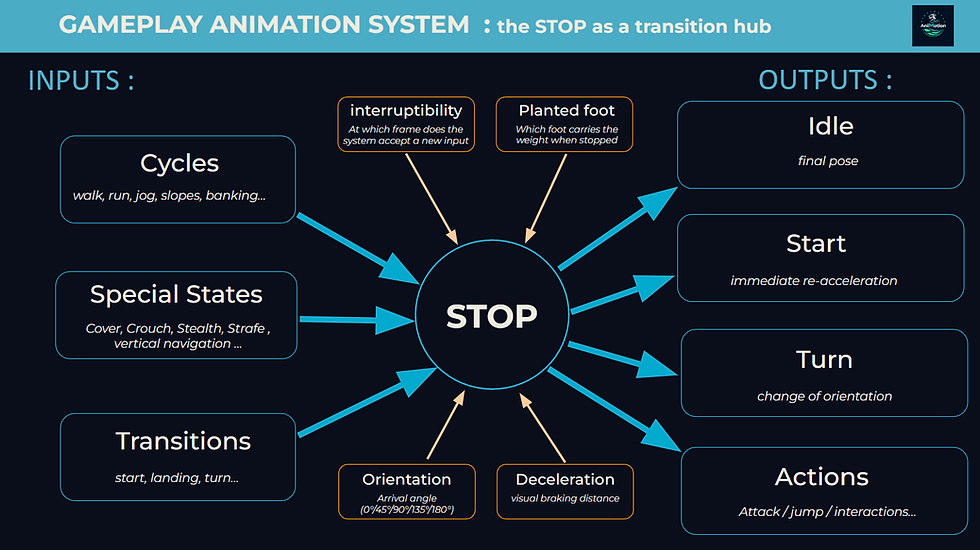
And when you bring these constraints into production, things get very real.
On Beyond: Two Souls, this was especially true.
Jodie had around fifty motion kits, each with its own left‑foot / right‑foot stops, plus oriented stops from −180° to 180° in 90° increments.
The engine blended them beautifully, but under strict conditions: same number of steps, same foot alternation.
We even had a step‑prediction system to trigger the right stop at the right moment and in the right place. It was surgical‑level precision work, entirely designed as a system.
On Ghost Recon, NPCs used a classic locomotion.
They had oriented stops for each state, on each foot, and for every possible direction (−180° to 180° in 45° increments).
The procedural blend was less powerful, but more flexible in production.
The system had to guarantee that NPCs reached a precise point with a coherent orientation. Especially for teammates, who need to obey the player’s orders and position themselves strategically during assaults.
In both cases, the conclusion is the same: a stop isn’t just a stop. It’s a crossroads.
And if you don’t build it as such, the entire moveset suffers.
Growing as a gameplay animator
There’s a moment that marks a before/after in a gameplay animator’s growth: the moment you truly understand what a stop is.
It’s not a nice-looking stop animation.
It’s the moment you realize the stop is a constant negotiation.
A negotiation with the engine, about what it can handle and what must remain in the animation.
A negotiation with the designers, about what the player needs to feel.
A negotiation with yourself, about what you’re willing to defend, what you accept to sacrifice, and why.
Shifting from “I’m making an animation” to “I’m building a behavior” is one of the key transitions in a gameplay animator’s career. And the stop is often where that shift happens for the first time.
A good stop is invisible: it melts into the controls.
A bad stop, on the other hand, draws attention and instantly breaks the feeling.
And that’s precisely why it deserves to be built with care, understood deeply, and defended with conviction.
Polish note: the stop’s follow‑through
There’s a small layer of polish that dramatically improves the perceived quality of a stop: the follow‑through.
It’s the moment right after the feet have finished braking.
The stop is set, but the body hasn’t yet dissipated all its inertia: the hips absorb the last weight transfer, the shoulders settle, and, most importantly, the arms finish their motion, catch their momentum, then naturally return toward the idle pose.
Without this follow‑through, you jump straight from the end of the stop to the root idle: the character “snaps” into their resting pose, as if all inertia vanished instantly.
With the follow‑through, the character completes their gesture. They’re still “breathing” for a fraction of a second after the stop, which reinforces the credibility of the movement.
It’s not essential in every game, but when the style allows it, it’s a small addition that brings a lot.
And ideally, this phase should remain interruptible, so you never sacrifice control responsiveness.
Conclusion
The stop asks the first question the system has to answer.
And that answer, fluid or sharp, grounded or light, reactive or weighted, sets the tone for everything that comes after.
Starts, turns, directional transitions: everything is built on what the stop establishes.
A solid stop means a system that can handle what follows.
It means a player who starts trusting their character.
It means a moveset that starts to come alive.
And it’s also a key moment in a gameplay animator’s growth.
Because the day you truly understand a stop, you’re no longer making an animation, you’re building a behavior.
A good stop disappears. A bad stop stands out.
In gameplay animation, you never really stop. You negotiate the stop.
And if you want to put these principles into practice, check out the Stop Challenge:
Download the Gameplay Animation Framework – STOP PDF (Frameworks section)
Understand the stop as a systemic crossroads
4 pages to structure solid gameplay stops: a complete Decision Sheet, a diagram of the STOP as a transition hub, and orientation logic with minimal combinatorics. Compact, clear, and designed as a production tool.


Comments